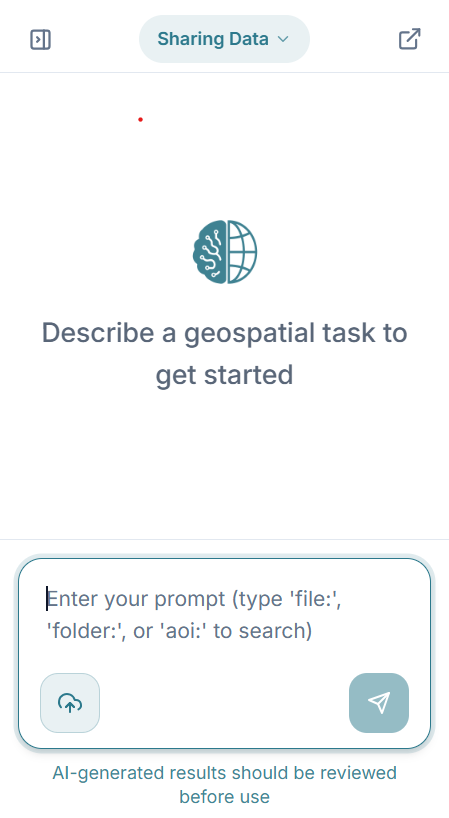
Right Sidebar (Agentic AI, Workspace Panel & Chat Tab)
Top Header
Features a "New Session" button pill to clear the current workspace context and spin up a fresh agentic task thread.
Empty State / Greeting Screen
- Displays a stylized globe/AI node icon.
- Main helper text: "Describe a spatial task to get started".
Floating and Resizable Chat Window
The chat window can be detached from its fixed dock to give you complete layout flexibility:
- Drag and Reposition: Drag the chat header to place the window anywhere over your workspace.
- Resize from Edges: Drag any edge or corner to expand or shrink the window dimensions.
- Minimize to Compact Tab: Minimize the window into a compact tab to maximize your map view.
- Dock Back: Snap the floating window back into the panel at any time.
- Persistent State: GriidAi remembers your customized position and size between visits.
Communicating with the AI (Chat Tab Interface)
Asking Questions
You can ask the AI natural language questions about uploaded data (e.g., 'What is the total area of the polygons in this layer?' or 'How many points intersect with this boundary?').
Product Help Answers with Help Center Links
You can also ask the chatbot questions regarding platform navigation, tools, and UI features (e.g., "How do I change the basemap?" or "How do I import data from Google Drive?").
- Actionable Steps: The AI returns concise, step-by-step guidance directly in the conversation.
- Help Center Links: Responses include direct links to relevant Help Center articles for detailed documentation.
Requesting Spatial Operations
Instruct the AI to perform complex GIS tasks (e.g., 'Buffer the river layer by 500 meters,' 'Intersect the flood zones with the building footprints,' or 'Filter the dataset to only show points within the city limits').
Tracking History & Results
Scrollable History
Previous prompts and AI responses scroll upwards so you can review prior steps in your analysis.
Rich Responses
The AI provides detailed text summaries, generates charts, or outputs tabular data directly within the chat interface to give immediate context.
Interactive Chat / Prompt Bar
Input Textarea & Direct File Upload
Positioned at the bottom of the chat panel, featuring:
- Prompt Input: Textarea with placeholder: Type your prompt (e.g., "file", "folder", or "task") to search.
- Direct Upload Button: Select the upload button right inside the composer to upload datasets directly into your active workflow without leaving the chat.
- Send Button: A paper-plane action button on the bottom right of the input box to submit prompts.
Voice Input
Select the microphone button in the prompt bar and allow microphone access if your browser asks. Speak your prompt, then select the button again to stop. Your words appear in the prompt box, where you can review or edit them before sending. Each recording can last up to 90 seconds; select the microphone again to continue. Voice input and supported languages depend on your account and browser.
Footnote
A subtle disclaimer note at the very bottom reminding users: "GriidAi may occasionally make mistakes. Consider verifying prompt parameters and data validity".