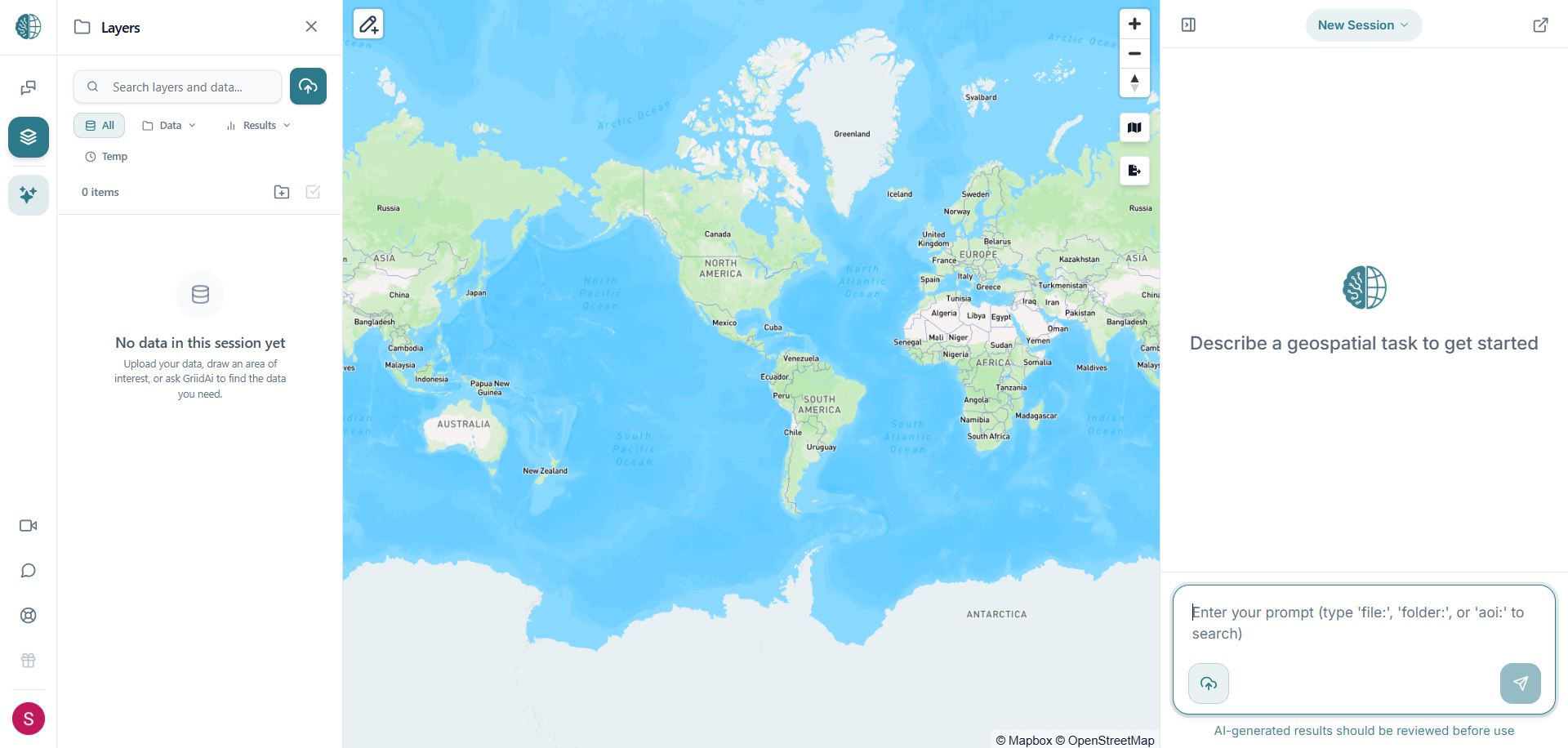
GriidAi Workspace Platform Interface Overview
Platform Interface Overview
Welcome to your GriidAi Workspace! Once logged in, you will be presented with the main platform interface. The workspace is organized into three primary functional areas: the Left Panel, the Central Area, and the Right Panel.
Quick Start Guided Demo
New to GriidAi? The platform home page includes a browser-based Quick Start Guided Demo preloaded with sample datasets (Austin neighborhoods, healthcare facilities, tables, and NDVI rasters). You can explore chat planning, background tasks, catalog updates, and raster workflows risk-free without using account credits or storage.
1. Left Panel: Data Catalog, Chat History & Application Tools
The Left Panel serves as your spatial data manager and primary gateway to platform support. You can collapse this panel at any time to maximize the map view.
Chat Session History & Search
- Search Chat Sessions: Search saved sessions by title or words contained within the conversation text.
- Work-Triggered Sessions: New workspaces initialize sessions only when you begin meaningful work (prompting, file uploading, or saving an Area of Interest).
- Session Restoration: Click any previous session to instantly reload its map state, layers, chat history, and context.
Data Catalog
- Stores raw and processed spatial datasets.
- Supports Shapefiles, GeoTIFFs, CSVs, GeoParquet, File Geodatabases, Zarr stores (v2/v3), and Google Drive imports.
- Create folders to organize datasets.
- Drag and drop files onto the map or double-click the eye icon to zoom directly to layer extents.
Layers Management & Symbology
- Control active map layers and toggle visibility.
- Reorder layers by dragging.
- Open the Symbology Editor to customize layer styling; all vector and raster changes are automatically saved with your session.
- Export layers as GeoJSON, Shapefile, GeoTIFF, and other supported formats.
Account Profile & Themes
- Theme Selection: Switch between Light, Dark, or Auto modes via the account menu (bottom-left). Auto mode mirrors your operating system preference.
- Account Tier: Hover over your user avatar at the bottom-left to view your active plan (Starter, Analyst, or Geospatial AI Pro).
2. Central Area: Main Map View & Attribute Table
- Map-Centric Workspace: Map canvas remains active and interactive throughout analysis.
- Basemap Choices: Switch between Hybrid (satellite imagery with road/label overlays), Streets, Satellite, Light, Dark, or No Basemap.
- Vector & Raster Rendering: Real-time visual updates as AI operations or filters execute.
- Top Toolbars: Drawing, region selection (AOIs), zoom extents, and basemap selectors.
- Attribute Table: Resizable split-screen table synchronized with active map selections.
3. Right Panel: Chat Box, AI Interaction & Credits
- Floating & Resizable Window: Detach the chat window, drag it anywhere, resize it, or minimize it into a compact tab to optimize screen space.
- Direct Composer Upload: Upload spatial data files directly from the prompt composer bar without navigating away from the chat.
- Voice Input: Speak a prompt into the chat composer, then review and send it. See Right Panel: AI & Chat for details.
- AI Spatial Operations: Prompt the assistant to buffer, intersect, filter, transform, and analyze datasets.
- In-App Product Help: Ask UI and navigation questions in the chat to receive concise steps and direct links to relevant Help Center articles.
- Session Credits & Usage: Monitor active credit consumption and processing job statuses in real time.